
SYNCORA SIMPLIFY
SYNC. SCALE.
ONE PLATFORM.
COMPLETE
BUSINESS CONTROL.

Manage your business, applications, teams, projects, users, and operations from one intelligent platform.
BRING EVERYTHING
INTO SYNC.
Syncora brings your business operations, applications, people, and information together in one centralized platform.

Manage companies, content, projects, users, communication, feedback, and business data with greater visibility and control—all from a single intelligent workspace.
One platform. One connected business.
POWERFUL TOOLS.
ONE CONNECTED PLATFORM.
Everything you need to manage your business operations, applications, and teams—organized in one place.

BUSINESS
Management

Manage companies, teams, services, assets, and everyday business operations from one centralized platform.

APPLICATION
Management

Manage multiple applications and projects while keeping your digital ecosystem organized and connected.
CMS
CONTENT

Create, organize, and manage business content efficiently through a centralized content management system.

USER
COMMUNICATION

Stay connected with users, manage enquiries, and keep important communications organized.

TEAM
Management

Coordinate projects, teams, activities, timesheets, and workflows to keep work moving efficiently.
REPORTS
CONTROL

Gain visibility into business activity, feedback, performance, and data with centralized reporting and management tools.

ACCESS SYNCORA

YOUR
 BUSINESS. CONNECTED
ONLINE!

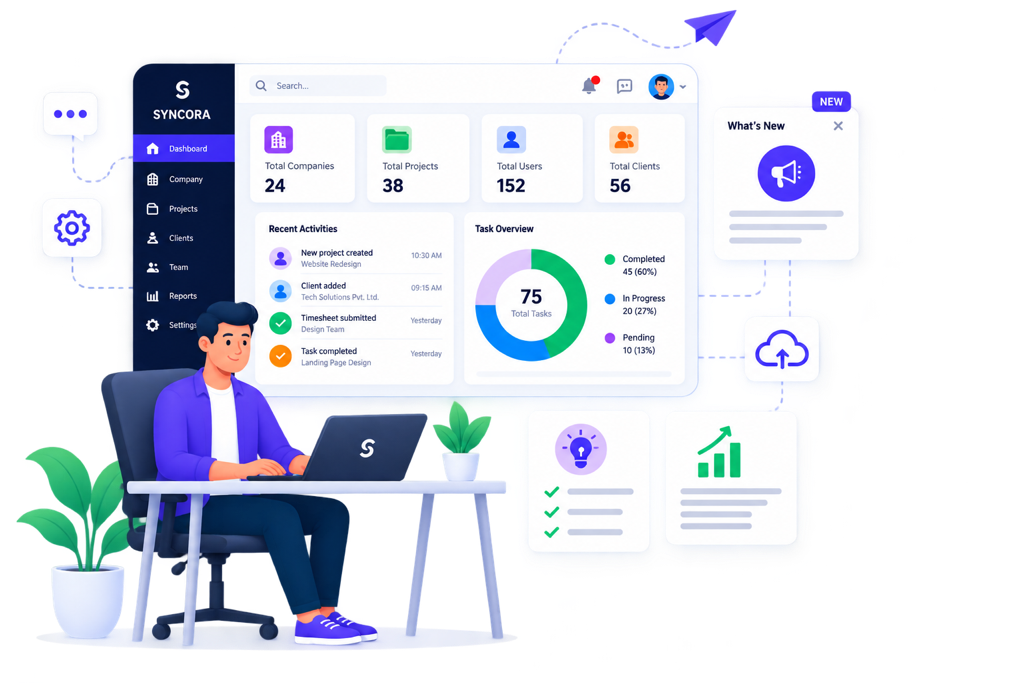
Access Syncora directly from your web browser and manage your business from anywhere.

No app installation. No complicated setup. Just sign in and get instant access to your centralized business management platform.

how
SYNCORA
WORKS
see it
in action!

From managing your company and projects to coordinating teams, clients, communication, and daily operations, Syncora brings everything together in one connected workspace.

This keeps the section focused on showing the web application in action, rather than talking about a mobile app.
Frequently Asked Questions
Syncora is a web-based workplace management platform designed to simplify task management, attendance, timesheets, communication, and day-to-day team coordination from one centralized system.
No. Syncora is currently a web application that can be accessed through a web browser on computers, tablets, and mobile devices.
Syncora is designed for businesses and organizations that want to manage employees, tasks, attendance, working hours, and internal communication more efficiently.
Syncora brings multiple workplace functions together, including:
  • Task Management
  • Attendance Management
  • Voice Notifications
  • Timesheets
  • Team/Employee Management
  • Integrations
  • Workplace productivity and enhancement
Yes. Syncora provides attendance-management capabilities that help organizations track and manage employee attendance centrally.
Yes. Employees can use the platform to view, manage, and keep track of assigned tasks and their work responsibilities.
Yes. Syncora provides timesheet functionality to help organizations record and manage working hours.
Yes. Syncora supports notification capabilities to help users stay informed about important tasks, updates, reminders, and workplace activities.
Yes. Syncora is designed with integration in mind, allowing organizations to connect it with relevant business systems and workflows.
Syncora is designed with security and controlled access in mind. Access to workplace information can be managed according to user roles and permissions.
Yes. Syncora can support role-based access so users can access the information and functionality relevant to their responsibilities.
Yes. Syncora can be used to organize and manage employees, tasks, and workplace activities across multiple teams or departments.
No. Since Syncora is web-based, users can access it through a supported web browser without installing a separate desktop application.
Simply access the Syncora web platform, create or receive your account credentials, and begin setting up your organization and users.
You can contact the Syncora team through the Contact/Support option available on the website.
BUILD FOR